Posts

Start writing applications using XULRunner
Image
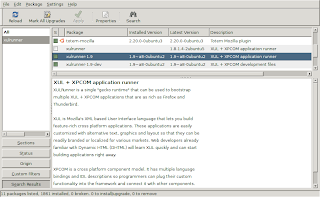
XULRunner is an interesting runtime environment developed by the Mozilla Foundation for providing a common back-end for XUL applications as rich as Mozilla Firefox or Songbird . There is a nice getting started tutorial available. It starts with explaining how to download and install XULRunner. If you are using Ubuntu open the Synaptic Package Manager (Top panel: System --> Administration --> Synaptic Package Manager) and search for xulrunner and install the most current version. If you can't find the xulrunner package, make sure that you have checked "Community-maintained Open Source software (universe)" from Ubuntu "Software Sources". Follow step 3 to 8. You should now see a window that looks something like this screenshot taken from Ubuntu Gutsy 7.10.

How to make Ubuntu even more safe?

Ever considered to make your Ubuntu installation even more secure? There is an excellent chapter available in the official Ubuntu documentation called "Keeping Your Computer Safe" that is worth to read. I used its sub chapter "Set up a firewall" to install the firestarter package - an Open Source visual firewall program that combines ease of use with powerful firewall features. To understand its basic features and how to use them you can read the quick tutorial from the Firestarter Online Manual . After completing the start wizard, some services that you might have on your machine such as a web server or a SSH server will not be reachable any longer from the outside because the default configuration set up provides strong protection against incoming intrusions. E.g. the connection from my Macbook via SSH to my Ubuntu machine wasn't possible any longer and therefore my rsync script described in my previous post " Synchronize files between a Macbook and an...

Using the Firefox extension ScribeFire for Blogging

If you are using the Mozilla Firefox Web browser, you can also use ScribeFire to post your blog easily from within the browser. It allows you to drag and drop formatted text from pages you are browsing, take notes, and post to your blog. You can even add easily labels to your post. Everything works very fast. As Firefox is a cross-pattform browser, you can use it on Linux/Mac/Windows. You can read more about ScribeFire on http://www.scribefire.com/ where you can also find the link to install it from the Mozilla Add-ons site. Somehow the length of the posts seem to be limited as I have noticed that longer posts (such as my post from March 4, 2008) will be not loaded completely in the ScribFire Editor, but I haven't found any information about the maximum allowed length of a post.

Google's Blogger Dashboard Widget for the Mac - another easy way to post

Another easy way to post a message to Blogger is using Google's Dashboard Widget for Mac. Its very basic text formating ( bold and italic ) should be sufficient if you want just post some short lines to your blog without advanced formating, links, images, media files, spelling check. In that case it is much faster than having to start first a browser or a full-blown desktop application. What I am missing is the feature to add labels for the post, so if you want to add labels you need to do this later directly in Blogger. Blogger Dashboard Widget for Mac is available from http://www.google.com/macwidgets/index.html .

Lessons learned from writing my first blog post with google docs writer

As I did use different computers at home (mainly Ubuntu and Mac OS) to write the post, I did appreciate that the document was always online although I had sometimes (especially at the end, when the document was already quite big) problems with lost connections that caused loss of some changes. I didn't experienced this before with smaller documents so I assume that either Google Docs Writer is not yet capable of handling long documents having pretty nasty HTML code inside (see the point about the code listing below ) or there had been connection problems caused by server problems. So I guess if I am about to write another similar post I might want to try a desktop application such as OpenOffice (with Sun Weblog Publisher extension) or I might want to separate the a bigger topic into several smaller posts (which would probably the best). I shouldn't use the Styles "Header 1" or "Header 2" from Google Docs as they let to too big headlines in the blog po...

Synchronize files between a Macbook and an Ubuntu machine using rsync via ssh

Have you ever considered mirroring/synchronizing your important files from your Mac to your Linux machine to decrease the risk of data loss because of a hardware crash? One very effective way to do this is using two open source tools available on your Mac and your Linux machine called rsync and ssh. This document will lead through the necessary steps. The main reason for this document was to have a reference for myself as it wasn't trivial. Maybe it can be helpful for others. As a precondition, it is assumed, that you have two computers that are connected via a network. I am using a Macbook with Mac OS X 10.4 Tiger and an Ubuntu PC with Ubuntu 7.10 Gutsy connected via a WLAN where I have verified all the steps. Some of the steps described are Mac / Ubuntu specific. Most information should be valid for other operating systems where ssh and rsync can be installed (e.g. other Linux distributions) but you might check out the distribution specifics if something should not work. ...