Posts

Install KDE on Ubuntu

If you like KDE besides Gnome on your Ubuntu installation just follow the tutorial How to install KDE on Ubuntu and type sudo aptitude update && sudo aptitude install kubuntu-desktop in the terminal to install Kubuntu.

Wireless network connection of a Dell Inspiron 530 with Ubuntu 8.04

Recently I bought an Desktop PC Inspiron 530 from Dell with Ubuntu 7.10 pre-installed to replace the very old Window PC that my parents used. I immediately upgraded the system to Ubuntu 8.04 and installed a subset of the additional software mentioned in my last post. In addition to this, I wanted to use a wireless network connection to avoid cables from the router to the PC (both are in different rooms). Therefore I bought a Belkin Wireless G USB Network Adapter F5D7050 v4002 uk (USB ID 050d:705c) together with the Dell PC. It was disappointing that the included documentation only explained how to install and use the Network Adapter in a Mircrosoft environment, so that I had to search the Web about how to install wireless network adapters in Ubuntu. I found links such as https://help.ubuntu.com/community/WifiDocs/WiFiHowTo , http://linuxwiki.de/LinuxWireless or http://wiki.ubuntuusers.de/WLAN . According to these pages, wireless still isn't always trivial using Linux and theref...

Customizing Ubuntu 8.04 LTE

Image
After installing Ubuntu 8.04 LTE (for the reasons mentioned in my previous post ), I started customizing this machine so that all my periphery devices are supported again and all additional software will be added and configured to my needs. Printer setup First, my printer should work again on my Ubuntu machine. I have bought my SAMSUNG CLP-300 Colour Laser Printer because of its good price/performance ratio and its platform independence (Windows, Mac OS X and Linux support was advertised). I used the closed-source driver from Samsung (current version is CLP-300 Unified Linux Driver ver.2.00.97 ) before. Now, I followed the recommendation on OpenPrinting database of Linux Foundation to give the open source printer driver foo2qpdl a try (following the short installation instruction on that site). Printing a test page and printing from Firefox worked immediately. Strangely, printing from OpenOffice needs some additional work as it didn't work. It is described in the section "S...

Harddisk crash - lessons learned

11 days ago my boot hard disk crashed during some Norton Antivirus scanning in Windows XP. My desktop PC is a Fujitsu-Siemens Computer Scaleo T A64 XP 50 AM2 0 2,0GB bougth in 2006. I had Windows XP installed on the original Sigate 320GByte disk that contained also all my data (as I wanted to use the same files from both Windows and Ubuntu and Windows can't write on the Ubuntu file system but Ubuntu can write on the Windows NFTS format). In addition I had installed a 400 GByte harddisk with a backup partition and my Ubuntu installation. The bios couldn't find the Sigate disk any longer and as this disk contained the boot loader - neither the Windows XP nor my Ubuntu 7.10 did start. An clicking noice confirmed that there was a serios problem with the Sigate disk. What to do? As I have a three-year service contract from Fujitsu-Siemens I first contacted the Fujitsu-Siemens service via the service phone I found under http://www.fujitsu-siemens.com . They aggreed to send somebody...

Start writing applications using XULRunner

Image
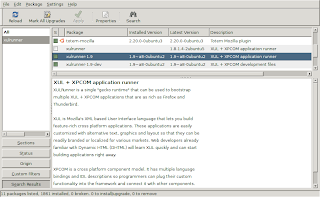
XULRunner is an interesting runtime environment developed by the Mozilla Foundation for providing a common back-end for XUL applications as rich as Mozilla Firefox or Songbird . There is a nice getting started tutorial available. It starts with explaining how to download and install XULRunner. If you are using Ubuntu open the Synaptic Package Manager (Top panel: System --> Administration --> Synaptic Package Manager) and search for xulrunner and install the most current version. If you can't find the xulrunner package, make sure that you have checked "Community-maintained Open Source software (universe)" from Ubuntu "Software Sources". Follow step 3 to 8. You should now see a window that looks something like this screenshot taken from Ubuntu Gutsy 7.10.

How to make Ubuntu even more safe?

Ever considered to make your Ubuntu installation even more secure? There is an excellent chapter available in the official Ubuntu documentation called "Keeping Your Computer Safe" that is worth to read. I used its sub chapter "Set up a firewall" to install the firestarter package - an Open Source visual firewall program that combines ease of use with powerful firewall features. To understand its basic features and how to use them you can read the quick tutorial from the Firestarter Online Manual . After completing the start wizard, some services that you might have on your machine such as a web server or a SSH server will not be reachable any longer from the outside because the default configuration set up provides strong protection against incoming intrusions. E.g. the connection from my Macbook via SSH to my Ubuntu machine wasn't possible any longer and therefore my rsync script described in my previous post " Synchronize files between a Macbook and an...

Using the Firefox extension ScribeFire for Blogging

If you are using the Mozilla Firefox Web browser, you can also use ScribeFire to post your blog easily from within the browser. It allows you to drag and drop formatted text from pages you are browsing, take notes, and post to your blog. You can even add easily labels to your post. Everything works very fast. As Firefox is a cross-pattform browser, you can use it on Linux/Mac/Windows. You can read more about ScribeFire on http://www.scribefire.com/ where you can also find the link to install it from the Mozilla Add-ons site. Somehow the length of the posts seem to be limited as I have noticed that longer posts (such as my post from March 4, 2008) will be not loaded completely in the ScribFire Editor, but I haven't found any information about the maximum allowed length of a post.